Image
Image editing
Editing photos with references instead of prompts — background swaps, product composites, style matching, and the Midjourney action chain from imagine to inpaint.
Generation gives you a picture. Editing gives you your picture, changed. That is a much more common job than it sounds: swapping a background behind a packshot, putting a product into a room that does not exist, dropping the same character into six scenes, fixing one corner of an image that is otherwise perfect. None of it is prompt engineering — it is a photo pipeline that happens to run on models.
Editing uses the same create endpoint as generating. Adding a non-empty urls
array to the request is what flips it from text-to-image to image-to-image;
there is no mode flag. Midjourney is the exception: it exposes an action
field, and follow-up actions reference an earlier generation by its taskId.
What people build with it
| The job | How it is done | Start with |
|---|---|---|
| Background swap on a product photo | one reference, prompt names the new background | nano-banana-pro, z-image |
| Put a product into a scene | two references, order matters | wan2.7-image, gpt-image-2 |
| Keep a character across many images | reference the same face every time | nano-banana-2, doubao-seedream-* |
| Match a brand look you cannot describe | pass a style reference instead of adjectives | gpt-image-2, doubao-seedream-* |
| Fix or replace one region | masked repaint | midjourney modal / inpaint |
| Extend a crop outward | pan and zoom out | midjourney pan / zoom |
| Turn a 2×2 grid into a final asset | upscale the tile you like | midjourney upscale |
| Describe an image in words | reverse-prompt it | midjourney describe |
The rule that saves the most time: stop describing a look you can show. Adjectives like "cinematic, muted, editorial" are a lossy encoding of a reference image you probably already have. Pass the image.
Which model, and when
nano-banana-pro / nano-banana-2 — the default editor. Up to 14
references, good instruction-following on "change this, keep that", and
4K output on -pro. This is the one to try first for background swaps and
object changes.
gpt-image-2 — the one that respects instructions and text. Takes up to 16
references (URLs or base64 data URIs, which matters when the source never
leaves your infrastructure) and is the only model that will edit a picture
containing readable words without turning them into gibberish.
wan2.7-image / wan2.7-image-pro — the compositor. One to four
references and, crucially, order is meaningful: refer to image 1 and
image 2 in the prompt and the model resolves them positionally. That makes it
the reliable choice for "put the object from A into the scene from B". It also
accepts exact width and height.
doubao-seedream-* — the reference-heavy one. Up to 14 references, and n
and urls share one budget of 15, so a heavy reference set means fewer outputs.
Good at holding a consistent style across a set.
z-image — the quick single edit. Exactly one reference, minimal
ceremony, and size becomes optional when editing — omit it and the output
follows the source image.
midjourney — the workflow, not the call. imagine returns a 2×2 grid;
everything afterwards operates on that grid by taskId. Upscale a tile, ask
for variations of it, pan the frame outward, zoom out for more context, repaint
a masked region. When an image needs to be worked on rather than generated,
this is the only model here that offers the moves.
Prompting an edit
An edit prompt has a completely different shape from a generation prompt. It is an instruction, not a description, and it needs two halves:
what changes → what must not change.
The second half is the one everyone forgets, and it is why edits come back with a different product, a different face or a re-lit scene.
Replace the overcast sky with a clear blue one. Keep the building, thelighting on the facade and the framing exactly as they are.
- Name the anchor explicitly. "Keep the product, its label and its position unchanged" is the single most valuable sentence in an edit prompt.
- One change per request. Two edits chained through two calls beat one request asking for both — and each intermediate result is a file you can fall back to.
- Address multiple references positionally. With
wan2.7-image*, image 1 and image 2 map to the order ofurls. Other models handle this less literally; keep multi-reference prompts short and unambiguous. - Style references beat style words. Passing a reference and saying "match the colour grade and grain of image 2" outperforms any list of adjectives.
Recipes
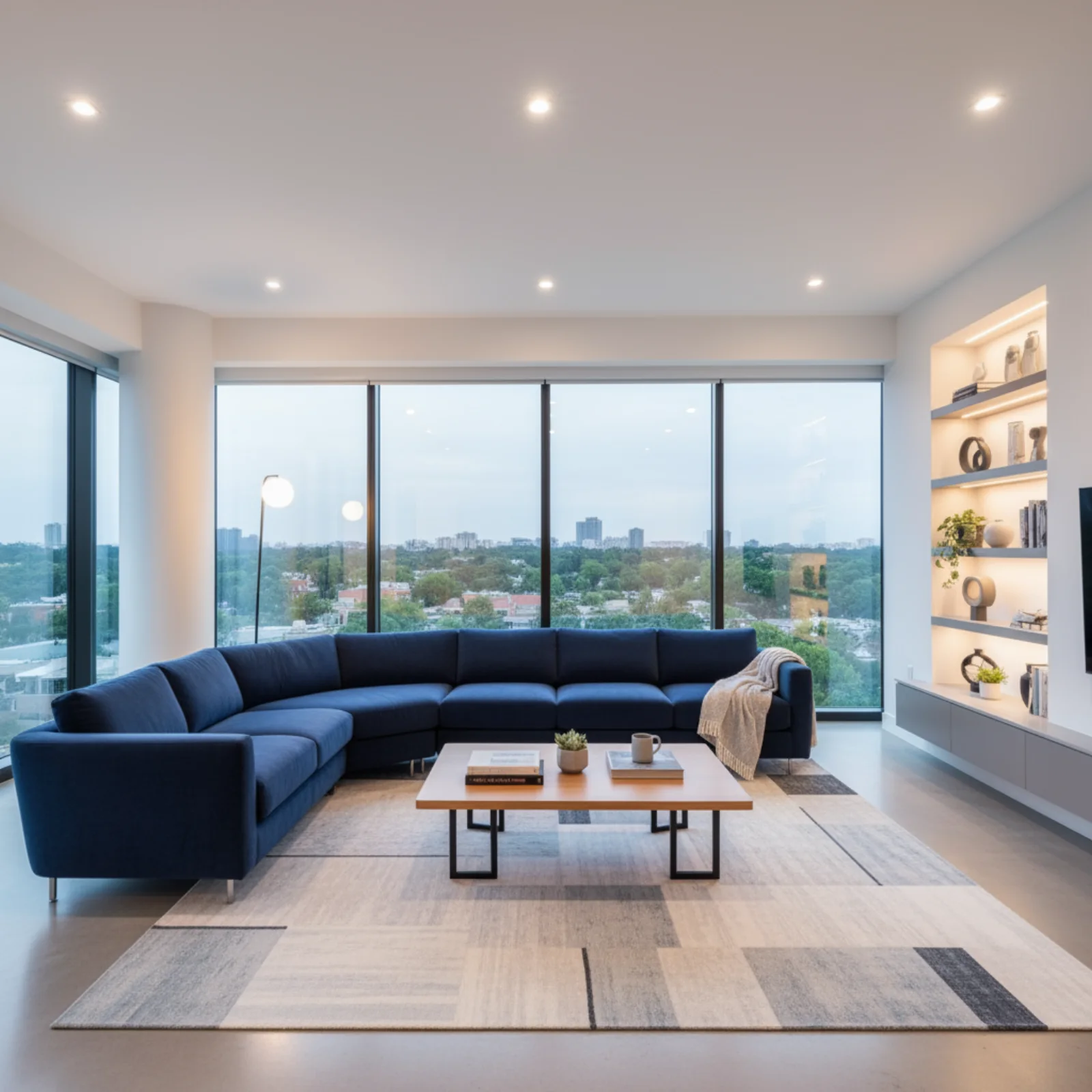
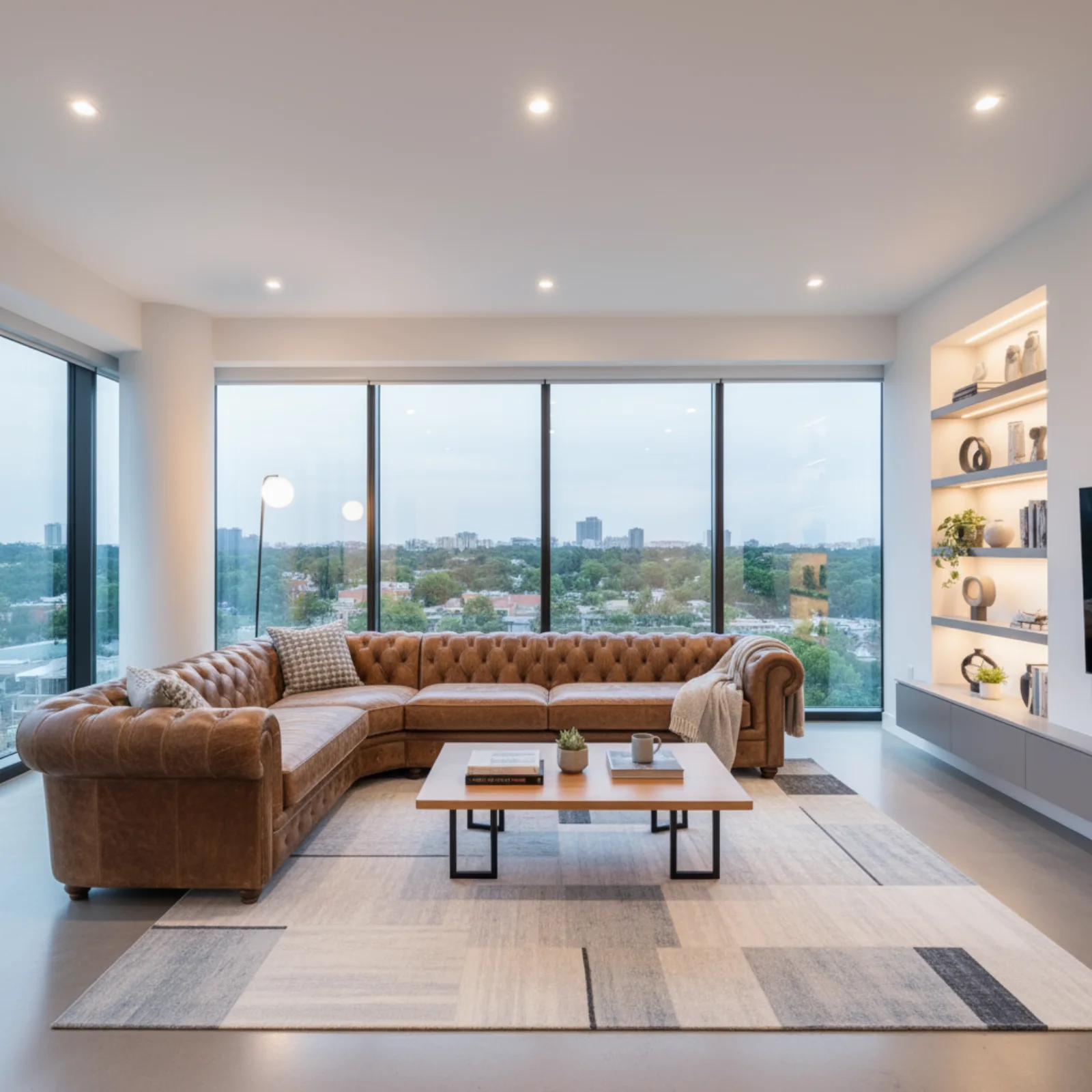
Replace one object, preserve the room — nano-banana-2, one reference:
The source image establishes the room, lighting and blue sofa before the edit:
Source: Google AI for Developers, used under CC BY 4.0; format and dimensions adapted.
Using the provided image of a living room, change only the blue sofa to be avintage, brown leather chesterfield sofa. Keep the rest of the room, includingthe pillows on the sofa and the lighting, unchanged.
The edit names one replacement and then explicitly freezes the room, pillows and light. That second sentence is what stops a local edit becoming a redesign.
Source: Google AI for Developers, used under CC BY 4.0; format and dimensions adapted.
Product into a room — wan2.7-image, two references in order:
Put the chair from image 1 into the room from image 2. Match the window lightand cast a soft shadow on the floor. Do not change the room's furniture orthe chair's upholstery.
Shadow direction is the tell in every bad composite, so ask for it by name.
Same character, new scene — nano-banana-2, character sheet as reference:
The person from the reference, now standing on a train platform at night,three-quarter view, rain, sodium lighting. Keep their face, hair and jacketidentical to the reference.
Reuse one reference image across the whole set rather than feeding each new output back in — errors compound fast when you chain generations.
Style match without adjectives — gpt-image-2, two references:
Redraw image 1 in the visual style of image 2 — same palette, line weight andgrain. Keep the composition and subject of image 1 unchanged.
Repaint one region — midjourney, action: "modal" with a maskUrl:
A ceramic mug in the masked area, same lighting and perspective as the rest ofthe frame
Everything outside the mask is untouched, which is what makes this different from re-running the prompt and hoping.
About these samples. Ready-made examples are copied to our own storage only when their source permits reuse. The exact prompt appears above each result, and the original source and license are linked below the media.
Reference image fields
Most image models that support editing read their source images from urls.
Midjourney edit actions use imageUrls instead. Supplying the corresponding
non-empty array is what selects image-to-image behavior; there is no separate
mode flag.
| Model | Field | Capacity | Accepts |
|---|---|---|---|
nano-banana, nano-banana-pro | urls | up to 14 | URLs |
nano-banana-2, nano-banana-2-lite | urls | up to 14 | URLs |
gpt-image-2 | urls | up to 16 | URLs or base64 data URIs |
doubao-seedream-* | urls | up to 14 | URLs or base64 data URIs |
wan2.7-image, wan2.7-image-pro | urls | 1–4 | URLs |
z-image | urls | exactly 1 | URLs |
grok-imagine-1.5-image | urls | 1 | URLs |
midjourney (edits) | imageUrls | up to 16 | URLs or base64 data URIs |
Reference images must be publicly reachable. The upstream provider fetches the URL directly — pre-signed URLs that expire in seconds will fail, and so will anything behind a login. The failure surfaces after the request has validated and been billed, as a task in
failed.
A single-image edit with z-image:
{"model": "z-image","input": {"prompt": "Replace the overcast sky with a clear blue one, keep the lighting on the building consistent","urls": ["https://example.com/facade.jpg"]}}
size is required for z-image text-to-image but optional when editing —
omit it and the output follows the reference image.
A multi-reference composite with wan2.7-image, where order is meaningful:
{"model": "wan2.7-image","input": {"prompt": "Put the chair from image 1 into the room from image 2, matching the window light","urls": ["https://example.com/chair.png", "https://example.com/room.jpg"],"size": "3:2"}}
Reference the slots as image 1, image 2 and so on inside the prompt — that
is how the model resolves them. wan2.7-image* also accepts an exact output
size through width and height, which overrides size.
gpt-image-2 and the Seedream models take the widest reference sets, up to 16
and 14 images respectively. Seedream's n and urls compete for the same
budget — the reference count plus the generated count must stay within 15,
which is why urls tops out at 14.
Midjourney is an action chain
midjourney is one public model covering every Midjourney endpoint. The
action field selects which one; it defaults to imagine.
Primary actions take a prompt and/or images and start a fresh job:
| Action | Requires | Produces |
|---|---|---|
imagine | prompt | a new 2×2 grid |
edits | prompt + imageUrls | an edited result |
blend | 2–4 imageUrls | a blend of the inputs |
describe | exactly 1 image in imageUrls | text describing the image |
Follow-up actions operate on a previous generation and require
parentTaskId — the taskId of an earlier midjourney generation of yours:
| Action | Also requires | Effect |
|---|---|---|
upscale | index or customId | upscale one tile |
variation | index or customId | variations of one tile |
high-variation | index or customId | stronger variations |
low-variation | index or customId | subtler variations |
reroll | — | re-run the parent prompt |
zoom | zoomRatio | zoom out from the tile |
pan | direction or customId | extend in one direction |
inpaint | index or customId | region repaint |
modal | maskUrl, prompt | masked repaint |
remix-strong | index or customId | strong remix |
remix-subtle | index or customId | subtle remix |
index addresses a tile of the parent grid and runs 1–4. customId is
the raw Midjourney button id; when it is present, index and direction
matching is skipped. direction for pan is left, right, up or down.
zoomRatio below 2 zooms out 1.5×; omitted or 2 and above zooms out 2×.
The mask for a masked repaint goes in maskUrl — a URL or base64 image where
white marks the region to repaint and transparent marks the region to keep.
A two-step Midjourney run
Step one: imagine. Note the taskId in the response — that is the handle
every follow-up needs.
curl -X POST https://api.apihubs.ru/api/v1/generation/create \-H "Authorization: Bearer sk-your-key" \-H "Content-Type: application/json" \-d '{"model": "midjourney","input": {"action": "imagine","prompt": "A weathered brass diving helmet on a workshop bench, volumetric dust","size": "1:1","version": "7","stylize": 300}}'
{"code": 200,"data": {"taskId": "019ca8c4-3e17-7b55-9f10-cc2b6de0a8f4","status": "not_started","createdAt": "2026-02-28T13:07:45.000Z"}}
Wait for that task to reach finished before referencing it — a follow-up
against an unfinished parent has nothing to resolve.
{"code": 200,"data": {"taskId": "019ca8c4-3e17-7b55-9f10-cc2b6de0a8f4","status": "finished","files": [{"fileUrl": "https://storage.apihubs.ru/generated/mj-grid-4c81.png","fileType": "image"}],"createdTime": "2026-02-28T13:07:45.000Z"}}
Step two: upscale the second tile. parentTaskId is the id from step one; the
upstream Midjourney task id is resolved from it internally.
curl -X POST https://api.apihubs.ru/api/v1/generation/create \-H "Authorization: Bearer sk-your-key" \-H "Content-Type: application/json" \-d '{"model": "midjourney","input": {"action": "upscale","parentTaskId": "019ca8c4-3e17-7b55-9f10-cc2b6de0a8f4","index": 2}}'
Each follow-up is a new generation with its own taskId, its own price and
its own status lifecycle. Chains are allowed: the taskId of an upscale can
itself be the parentTaskId of a zoom.
The same chain in TypeScript, with the wait folded into a helper:
const BASE = "https://api.apihubs.ru/api/v1";const KEY = process.env.API_STOCK_KEY!;async function submit(input: Record<string, unknown>): Promise<string> {const res = await fetch(`${BASE}/generation/create`, {method: "POST",headers: {Authorization: `Bearer ${KEY}`,"Content-Type": "application/json",},body: JSON.stringify({ model: "midjourney", input }),});const body = await res.json();if (!res.ok) throw new Error(`${body.error.code}: ${body.error.message}`);return body.data.taskId;}async function wait(taskId: string) {for (;;) {await new Promise((r) => setTimeout(r, 5_000));const res = await fetch(`${BASE}/task/status/${taskId}`, {headers: { Authorization: `Bearer ${KEY}` },});const body = await res.json().catch(() => null);if (!res.ok) {const message = body?.error?.message ?? `${res.status} ${res.statusText}`;throw new Error(message);}const { data } = body;if (data.status === "finished") return data;if (data.status === "failed") throw new Error(data.errorMessage);}}const gridId = await submit({action: "imagine",prompt:"A weathered brass diving helmet on a workshop bench, volumetric dust",size: "1:1",version: "7",stylize: 300,});await wait(gridId);const upscaleId = await submit({action: "upscale",parentTaskId: gridId,index: 2,});const upscaled = await wait(upscaleId);console.log(upscaled.files[0].fileUrl); // → https://storage.apihubs.ru/...
Panning, zooming and masked repaint
Extending the canvas to the left:
{"model": "midjourney","input": {"action": "pan","parentTaskId": "019ca8c4-3e17-7b55-9f10-cc2b6de0a8f4","index": 2,"direction": "left"}}
Zooming out 1.5× instead of the default 2×:
{"model": "midjourney","input": {"action": "zoom","parentTaskId": "019ca8c4-3e17-7b55-9f10-cc2b6de0a8f4","index": 2,"zoomRatio": 1.5}}
Repainting a masked region:
{"model": "midjourney","input": {"action": "modal","parentTaskId": "019ca8c4-3e17-7b55-9f10-cc2b6de0a8f4","index": 2,"prompt": "Replace the bench with a slab of sea-worn granite","maskUrl": "https://example.com/mask.png"}}
describe and blend
describe inverts the usual direction: it takes exactly one image and asks
Midjourney for prompt text describing it. Read the finished task's output
field — non-media results are surfaced there rather than in files.
{"model": "midjourney","input": {"action": "describe","imageUrls": ["https://example.com/reference.jpg"]}}
blend merges 2 to 4 images with no prompt at all. dimensions picks the
output shape — SQUARE (the default), PORTRAIT or LANDSCAPE — and a
size string overrides it.
{"model": "midjourney","input": {"action": "blend","imageUrls": ["https://example.com/texture-a.jpg","https://example.com/texture-b.jpg","https://example.com/texture-c.jpg"],"dimensions": "LANDSCAPE"}}
Fewer than 2 or more than 4 images in blend, or anything other than exactly 1
in describe, is rejected at create time.
When it fails
Midjourney's per-action requirements are enforced before the request leaves the platform, and the message names the missing field:
{"code": 400,"error": {"message": "action \"variation\" requires index or customId","type": "BadRequest","code": "invalid_input"}}
Other common rejections:
action "upscale" requires parentTaskId— every follow-up action needs one.action "blend" requires 2–4 imageUrls.action "describe" requires exactly 1 image in imageUrls.action "imagine" requires a prompt—imagineandeditsare the only actions that demand one.
Editing failures that originate upstream arrive as a task in failed with an
errorMessage. Reference images containing recognisable people are the most
frequent cause, and those rejections are terminal — the debit is refunded and
no reserve provider is tried.
Next steps
- Image generation — the text-only path and batches.
- Image models — every field for every image model.
- Files & storage — result URLs are valid for 24 hours.
- Polling task status — reading
output. - Errors & error codes.
Run this with your own key
Every model in this guide is live in the API Hubs catalog — one API key, one prepaid balance, no separate signup per provider.